Quick Answer: KIRA is a Meta-verified Solution Provider that connects Malaysian businesses to the WhatsApp Business API. You'll need a business account verified by Meta and a provider like KIRA to enable WhatsApp messaging, payment collection, and automated customer support in one platform. Setup takes 1-2 weeks and costs include Meta's per-message charges plus your provider's monthly fee.
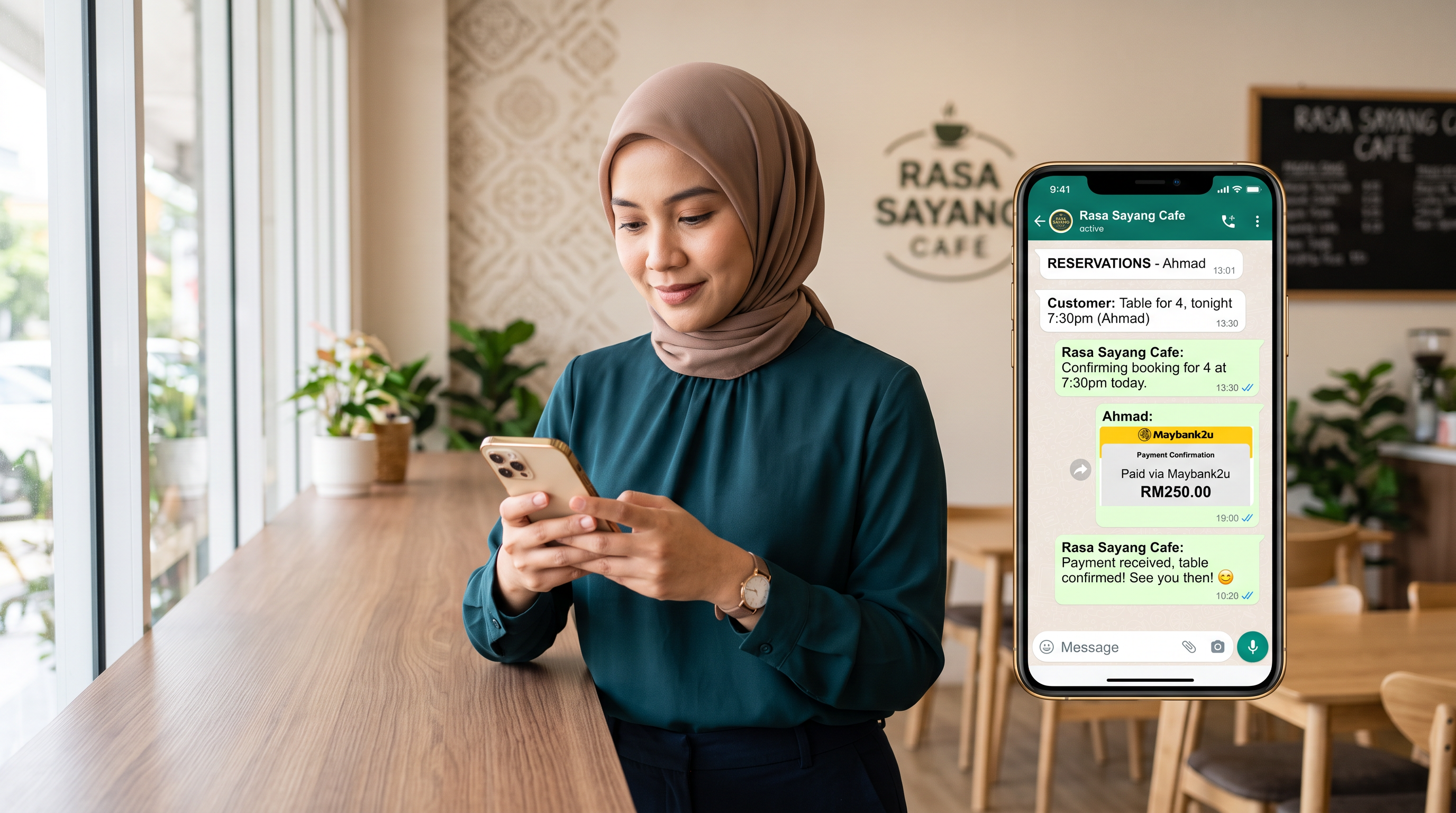
Most Malaysian businesses lose customers because they respond to WhatsApp messages hours later. A restaurant gets a reservation request at 2pm and replies at 6pm. A clinic schedules appointments manually via voice calls. A beauty salon tracks bookings in a notebook. The WhatsApp Business API solves this by turning WhatsApp into your operating system for customer conversations, payments, and support.
How to Get a WhatsApp Business API in Malaysia
The steps are straightforward but require moving through Meta's approval process. First, register a business account with Meta. Second, verify your business details with Meta (this takes 2-5 days). Third, choose a Solution Provider like KIRA to host your API connection. Fourth, integrate your business systems—your booking software, payment processor, or support tools. You're live when your phone number is registered and verified with Meta.
The verification step matters. Meta checks that your business is real, that your use case matches policy, and that you're not sending spam. If you misrepresent your business or skip required documentation, you'll be rejected and face a waiting period before reapplication.
A salon owner in Kuala Lumpur registers her business with Meta, uploads her business license and shop photos, then contacts KIRA. KIRA handles the technical setup. Within a week, she's messaging customers directly from WhatsApp instead of managing SMS and voice calls separately.
- Register your business with Meta using your business email and legal documents
- Submit your business for Meta verification (2-5 business days)
- Contact KIRA and select your business category and message volume tier
- Integrate your booking, payment, or CRM system with the WhatsApp API
- Send your first test message and monitor delivery
- Configure your automated responses and escalation rules
WhatsApp Business API Costs in Malaysia
Costs come in two layers: Meta's message charges and your Solution Provider's monthly fee.
Meta charges for messages sent through the WhatsApp Business API. You pay only for messages your business sends (inbound customer messages are free). The rate depends on the message type and the recipient's location. Transactional messages (booking confirmations, payment reminders, appointment alerts) cost less than marketing messages (promotional offers, newsletters).
Your Solution Provider charges a monthly fee to host and manage your API connection. This covers the technical infrastructure, the dashboard, integrations, and support. KIRA's pricing varies by business type and volume.
A dental clinic in Penang uses the API for appointment reminders (transactional messages), which cost less than marketing messages. A restaurant uses it for order confirmations and payment reminders. A retail store sends inventory alerts. All pay Meta's per-message fee plus their provider's monthly cost.
| Cost Component | Who Charges | What You Pay For | Example |
|---|---|---|---|
| Message fees | Meta | Per message sent (inbound free) | 10,000 transactional messages = cost varies by destination |
| Provider fee | KIRA | Monthly hosting, dashboard, support | See KIRA pricing page |
| Integration setup | KIRA or your developer | One-time technical work | Connect to your booking system |
Don't assume the API is cheap at scale. A business sending 10,000 transactional messages per month will see meaningful costs. Budget for both Meta's per-message charges and your provider's monthly fee before you commit.
Choosing the Right Provider: KIRA vs Meta Direct
You cannot use the WhatsApp Business API without a Meta-approved Solution Provider or by setting up a direct connection with Meta. Most businesses use a Solution Provider because the technical setup is complex and the provider handles ongoing support.
Meta Direct means you build the integration yourself or hire a developer to do it. You save the provider fee but you own all the infrastructure, all the scaling, and all the support. Most businesses find this more expensive over time because developer time is expensive and you're managing a system instead of running your business.
| Feature | KIRA (Solution Provider) | Meta Direct (Self-Hosted) |
|---|---|---|
| Setup complexity | Simple, guided process | Technical, requires development |
| Dashboard included | Yes, pre-built for SMBs | You build it or use a third-party tool |
| AI agent for support | Lojain AI included | You build or buy separately |
| Ongoing support | KIRA support team | You own all support |
| Message cost | Meta rate + KIRA fee | Meta rate only |
| Time to launch | 1-2 weeks | 6-12 weeks or more |
| Best for | Restaurants, clinics, salons, retail, SMBs | Large enterprises with in-house dev teams |
Choose KIRA if you want to move fast and have professional support. Choose Meta Direct if you have a development team and you're comfortable owning the infrastructure and scaling complexity.
Common Mistakes When Setting Up WhatsApp Business API
Mistake 1: Rushing the Meta verification. Businesses sometimes misrepresent their use case or business type to speed up approval. Meta flags this and bans the account. Verification takes 2-5 days. Wait it out.
Mistake 2: Sending marketing messages as transactional messages. Meta monitors this and will shut your access off if you abuse the cheaper rate for marketing sends. Use the right message category for what you're actually sending.
Mistake 3: Not integrating with your existing tools. You set up the API but you don't connect it to your booking system, your payment processor, or your inventory. Now you're managing WhatsApp messages separately from everything else. You've added work instead of removing it.
Mistake 4: Assuming all business types qualify. Some business categories face stricter Meta scrutiny (financial services, gambling, adult content). Check Meta's policy before applying. If your business is high-risk, you may need extra documentation or approval steps.
Mistake 5: Treating the API like a broadcast channel. The API works best for one-to-one conversations with customers, not mass marketing. Customers will block you if you send unwanted messages. Use it for responses, confirmations, and reminders.
Using AI to Respond in Under 3 Seconds, 24/7
Manual WhatsApp responses create bottlenecks. A customer messages at 11pm. Your team is asleep. They message a competitor instead. Brands using Lojain AI respond in under 3 seconds, 24/7, handling routine questions without human delay.
A hotel uses Lojain AI to answer "What time is checkout?" and "Do you have a pool?" instantly. A clinic answers "What are your hours?" and "Do you accept my insurance?" A restaurant confirms reservations and takes payment details automatically. Your team only handles escalations and complex requests.
Lojain AI works in Arabic and English. It learns from your FAQ, your policies, and your past conversations. It can negotiate pricing objections, handle complaints, and route customers to your team when needed.
Setting Up Payment Collection on WhatsApp
The WhatsApp Business API integrates with payment processors so customers can pay directly through WhatsApp messages. A restaurant collects payment for a delivery order. A clinic collects a deposit for a consultation. A salon collects payment for a service booking.
You control which products or services have payment buttons in WhatsApp. When a customer clicks "Pay," they enter their card details (you don't handle or see the card number—the payment processor does). The payment is confirmed instantly and your business receives notification.
Setup requires connecting your payment processor to the WhatsApp API through your Solution Provider. KIRA handles this integration for providers like Tap Payments and other regional processors.
Multilingual Support for Malaysian and Gulf Markets
Malaysia serves customers across Southeast Asia and the Gulf. The WhatsApp Business API supports multiple languages. Lojain AI handles Arabic and English conversations in the same thread—no switching between systems, no duplicate conversations.
A travel agency in Kuala Lumpur books Gulf tourists. They use Lojain AI to answer booking questions in both Arabic and English. A hotel does the same for reservations. A retail store handles customer support in both languages from one WhatsApp number.
Compliance and Data Safety in Malaysia
Malaysia's data protection rules (PDPA) require that you handle customer data securely. The WhatsApp Business API is encrypted end-to-end. Customer messages, phone numbers, and payment information stay encrypted in transit and at rest.
You should inform customers that you're using WhatsApp for business communication. Include this in your privacy policy and terms of service. Meta and your Solution Provider are responsible for API security; you're responsible for how you use customer data once you receive it.
Measuring Success After Launch
Once you're live, monitor three things: response time, message delivery rate, and conversion rate.
Response time measures how quickly you or your AI agent replies to customer messages. Faster response = more conversions.
Delivery rate is the percentage of messages that reach the customer successfully. Failed deliveries usually mean the customer's phone is off, they've blocked your number, or they've uninstalled WhatsApp.
Conversion rate is what matters most: which messages lead to bookings, payments, or sales. Track this by message type. Which booking reminders actually lead to confirmed reservations? Which payment reminders lead to completed transactions? Use this data to refine your messaging.
FAQ
Do I need to move my personal WhatsApp number to the Business API?
No. Your personal WhatsApp stays separate. The Business API uses a dedicated business number that you register with Meta. Customers message this business number, not your personal account.
How long does Meta verification take?
2-5 business days in most cases. High-risk industries (financial services, gambling) may take longer. Some businesses are approved within 24 hours. Don't rush it.
Can I send promotional messages on WhatsApp Business API?
Yes. Messages are classified as "marketing" or "transactional." Transactional messages (confirmations, reminders, alerts) are cheaper. Marketing messages (promotional offers, newsletters) cost more. Use the right category.
What payment methods does KIRA accept?
See KIRA's pricing page for current payment options and accepted methods.
Does the WhatsApp AI handle complaints in Malay?
Lojain AI supports Arabic and English natively. For Malay-specific requests, your team manages those conversations. You can configure Lojain to escalate to your team when it detects Malay language input.
Can the API work with my existing booking software?
KIRA integrates with common booking and CRM platforms. Contact KIRA directly to check if your specific tool is supported.
What's the difference between a chatbot and Lojain AI?
Lojain AI is a WhatsApp agent that handles complex customer conversations: answering questions, negotiating pricing objections, handling complaints, following up, and escalating to your team when needed. A traditional chatbot handles simple templated responses like "Your order is #12345." Lojain AI has context, judgment, and memory across conversations.
Can I use the same phone number for personal WhatsApp and the Business API?
No. The Business API requires a dedicated business number. You keep your personal number for personal use.
What happens if my WhatsApp Business API account gets suspended?
Meta suspends accounts that violate policy (sending spam, misrepresenting use case, abuse). If suspended, you can appeal within 30 days. Prevention is easier: use the API correctly, categorize messages accurately, and follow Meta's business policies.
Is the WhatsApp Business API suitable for small businesses in Malaysia?
Yes. KIRA offers bundles for SMBs that include the API, dashboard, and basic Lojain AI. Start small, track results, and scale as needed.
Talk to Us on WhatsAppReady to Scale Your Marketing with AI?
KIRA delivers AI-powered marketing systems, WhatsApp automation, and media buying strategies for businesses worldwide.
Book a Strategy Call More ArticlesGet KIRA in your AI answers
Add KIRA as a Google Preferred Source so our articles show a "Preferred" badge in your AI Overviews & AI Mode results. Log in to Google, then tick the box next to kiraco.org.
Add KIRA as a Preferred Source