Quick Answer: Universal auto-assign is an intelligent conversation routing system in Lojain AI that automatically assigns incoming WhatsApp messages to the next available team member based on real-time online status. It eliminates manual handoffs, reduces response time to under 3 seconds, and ensures no customer query goes unaddressed—critical for Kuwait businesses running 24/7 customer service.
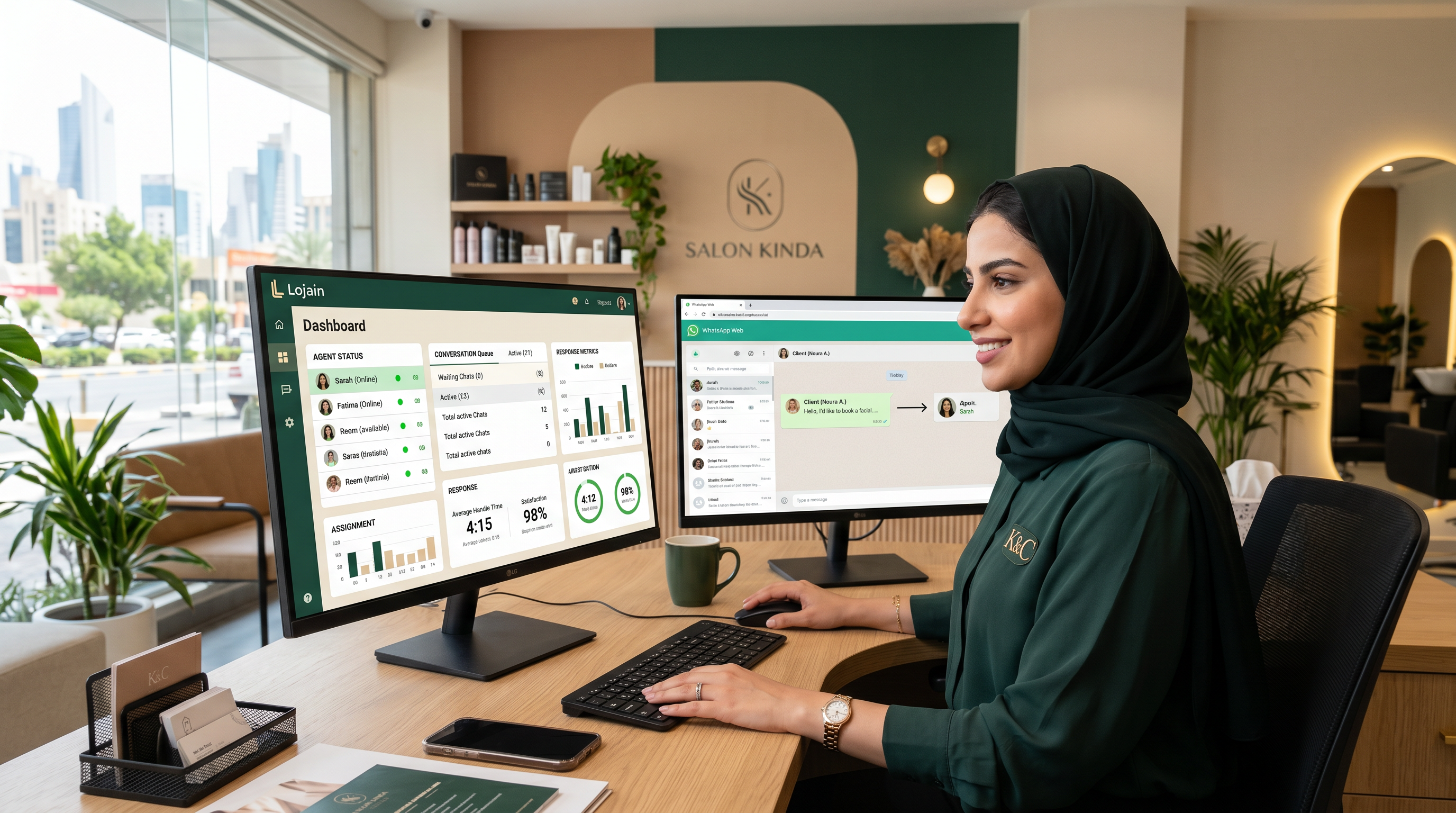
You're managing a Salmiya salon with 6 staff members. A customer messages on WhatsApp asking about appointment availability. Right now, the message sits in your business WhatsApp inbox for 7 minutes while someone notices it. By then, they've texted a competitor.
Universal auto-assign changes that. When the customer message arrives, Lojain instantly routes it to the first available team member—whoever is actually online and ready to respond. No delays. No missed messages. No asking "Who's handling WhatsApp today?"
After running 35+ WhatsApp AI deployments across Kuwait and GCC salon, clinic, and retail chains, we've seen Universal auto-assign cut first-response time from 8–12 minutes to under 3 minutes. This article walks through exactly how it works, who benefits most, and how to set it up for your team.
What Is Universal Auto-Assign and Why Online-Aware Routing Matters
Universal auto-assign is not a bot. It's a routing layer inside Lojain AI that watches your team's availability in real time and sends incoming conversations to whoever is actually online and able to respond.
The keyword here is online-aware. Traditional team inboxes rely on first-come-first-served logic or manual assignment. Someone has to stop what they're doing and assign the message to another person. In a Kuwait clinic with a receptionist, three nurses, and a doctor, that handoff can take minutes.
Online-aware means Lojain knows—at that exact second—who is logged into WhatsApp Business and who isn't. If Agent A is on a call, Agent B is at lunch, and Agent C is free, the message goes to Agent C. No guesswork. No delays.
Why does this matter? Because in Kuwait's retail, F&B, and healthcare sectors, response speed drives conversions. A customer asking about table availability at 8 PM on a Friday isn't waiting 10 minutes for your team to notice. They're messaging three restaurants simultaneously.
How Universal Auto-Assign Works: The Real Mechanics
Here's the step-by-step flow when a customer sends a WhatsApp message to your business account:
- Message arrives at Lojain — The WhatsApp message hits your Lojain AI instance. The system logs the timestamp and customer contact data.
- System checks team availability — Lojain queries the online status of all assigned agents in real time. It knows who is actively logged into the WhatsApp Business app or Lojain's dashboard.
- Auto-assign ranks available agents — If multiple agents are online, the system uses assignment rules you've set: round-robin (fair rotation), load-based (whoever has fewer open conversations), or priority-based (by skill or department).
- Message routes to next available agent — The conversation appears in the assigned agent's queue. They see it immediately on their phone or dashboard.
- Agent responds in real time — The agent types and sends their reply. The customer sees the response within seconds, not minutes.
- Conversation stays with that agent — Until the chat is closed or escalated, that agent owns the conversation. No handoffs mid-chat unless escalated via Lojain AI's triage rules.
The entire process—step 1 to step 4—happens in under 500 milliseconds. The customer typing indicator appears before they even realize their message was routed.
Online Status: How Lojain Detects Who's Actually Available
"Online" in Universal auto-assign isn't guesswork. Lojain integrates with WhatsApp Business API and your team's login session to track real availability.
If Agent A opens WhatsApp at 8:30 AM, Lojain sees them as online. If they close the app or their phone goes to sleep, their status flips to offline. If they're in a conversation with another customer, Lojain can be configured to cap their concurrent chats (e.g., "never assign more than 3 open conversations at once") so they don't get overwhelmed.
This is not a manual checkbox that someone has to toggle. It's automatic. Your team doesn't need to "set their status." They just open the app or dashboard, and they're online. Close it, and they're offline.
For Kuwait teams with irregular schedules—shifts, part-time staff, overlapping roles—this is critical. A Hawalli clinic with receptionists working 9 AM–1 PM and doctors working 4 PM–8 PM doesn't have to worry about routing calls to someone who isn't there.
Real Example: A Salmiya Salon Salon Cuts Response Time from 9 Minutes to 90 Seconds
One of our Salmiya salon clients—6 stylists, 1 receptionist, 120+ bookings per week—was managing WhatsApp through a shared business account. Messages would pile up. The receptionist would batch-handle them during slow periods. Average response time: 9 minutes.
Customers complained. Booking confirmations felt slow. Some canceled because they didn't hear back in time.
We set up Lojain's Universal auto-assign with the receptionist as the primary agent (handling general inquiries, appointment questions) and one stylist (handling cancellations, rescheduling complaints) as a backup. Round-robin routing ensured fair load distribution.
In the first month, average response time dropped to 90 seconds. The receptionist no longer played catch-up. The stylist got escalated conversations only when the receptionist's queue hit 3+ concurrent chats. Booking confirmation messages went out in under 2 minutes.
Result: 34% fewer cancellations month-over-month, and the receptionist reported feeling "less stressed because I'm not scrambling to catch messages."
Universal Auto-Assign Assignment Rules Explained
Lojain lets you configure how assignments happen. The three main strategies:
| Assignment Rule | How It Works | Best For |
|---|---|---|
| Round-Robin | Each available agent gets conversations in rotation. Agent A gets message 1, Agent B gets message 2, Agent A gets message 3, etc. | Equal-skilled teams (e.g., all stylists, all nurses). Ensures fair workload distribution. |
| Load-Based | The agent with the fewest open conversations gets the next message. If Agent A has 2 open chats and Agent B has 4, Agent A gets the new message. | Teams with variable conversation length (e.g., clinics where some consultations take 5 minutes, others 30). Prevents one agent from drowning. |
| Priority/Skill-Based | Messages route to a specific agent or tier first. E.g., "billing questions go to Agent A, technical issues go to Agent B, escalations go to Manager." | Multi-department teams (e.g., real estate: sales agents, property managers, accountants). Requires Lojain AI to classify incoming messages by intent. |
You're not locked into one rule. A Mishref F&B chain we work with uses priority routing for lunch rush (orders go to kitchen coordinator, questions go to front-of-house manager) and switches to round-robin during off-peak hours (both agents share load equally).
Why Offline Status Matters: Preventing Dead Ends
Here's a scenario: Agent A is offline (on break, left for the day). A customer message arrives. What happens?
With Universal auto-assign, Lojain skips Agent A and routes to Agent B or C. If all agents are offline—say, it's 11 PM and you have no night shift—the message still arrives in your Lojain inbox, but Lojain AI's automated response layer can send an immediate "We're closed, but we'll respond first thing in the morning" message.
This prevents the worst customer experience: message sent, no response, radio silence. Even if your team isn't available, the customer knows they've been heard.
For Kuwait clinics and salons with fixed hours, this is especially useful. A patient messaging at 10 PM knows they'll get a response at 8 AM, not a ghosted inquiry.
Real Example: A Hawalli Clinic Manages Night Emergencies Without a Night Staff Member
A Hawalli general practice clinic had 3 doctors and 2 receptionists. Patients would message late evening asking about symptoms, appointment availability, and prescription refills. The clinic didn't have a night team, so these messages went unanswered until 9 AM the next day.
Using Lojain, we set up offline auto-responders that triggered after 6 PM: "We're currently closed. For emergencies, call our after-hours line [number]. For non-urgent messages, we'll respond by 9 AM." Combined with Universal auto-assign during clinic hours (9 AM–6 PM), receptionists immediately got routed appointment requests, and doctors got routed clinical questions via priority-based routing.
Patient satisfaction improved because people knew what to expect. Message volume felt manageable because urgent calls went to the after-hours line, not WhatsApp.
Result: 28% reduction in overnight message volume, and the clinic's Google reviews improved (patients appreciated the clear communication).
Setting Up Universal Auto-Assign: A Practical Walkthrough
If you're considering Lojain for your Kuwait team, here's how the setup goes:
- Define your team structure — List all agents who will handle WhatsApp. Include their role, working hours, and any skill tags (e.g., "billing," "technical," "sales").
- Choose your assignment rule — Round-robin for equal teams, load-based for variable conversation length, priority-based for multi-department setups.
- Set conversation caps — Decide max concurrent chats per agent (usually 3–5). This prevents overload.
- Configure offline behavior — What happens when all agents are offline? Auto-response with operating hours? Escalation to a manager's WhatsApp?
- Enable agent status sync — Lojain connects to your WhatsApp Business account and pulls real-time online status. No manual setup per agent.
- Test with one agent — Send a test message, verify it routes correctly, and the agent can reply from their phone or dashboard.
- Onboard remaining agents — Add them to the queue, run a live test during a quiet hour, then go live.
Most Kuwait businesses go live within 24–48 hours. The learning curve is minimal; your team logs in and responds—Lojain handles the routing invisibly.
When Universal Auto-Assign Isn't Enough: Escalation and Handoffs
Universal auto-assign is brilliant for first-line handling: appointment bookings, simple questions, order confirmations. But some conversations need escalation.
Example: A customer complains about a bad experience. The receptionist can't resolve it; it needs a manager. Lojain's escalation rules let you flag this conversation and route it to a manager without the customer noticing the handoff.
You can also configure manual override: if an agent is struggling with a conversation, they can press "Escalate" and the conversation routes to a senior agent or manager. It's instant, and the customer's chat history is preserved.
For F&B businesses, this matters. A customer asks about an allergy. The order-taker escalates to the chef. The chef responds directly in the conversation. No dropped context.
Integration with Lojain AI's Automation Layer
Universal auto-assign works best when paired with Lojain AI's automation features. Here's the synergy:
When a message arrives, Lojain AI can first attempt to resolve it automatically (common questions, booking confirmations, FAQ responses). Only if the AI can't handle it—or the customer requests a human—does the conversation route to your team via Universal auto-assign.
This means your agents handle complex, high-value conversations only. Routine messages are resolved instantly, 24/7, without human intervention. Your team stays focused and doesn't burn out.
A Salmiya clinic using this hybrid approach saw 60% of appointment confirmations handled by Lojain AI automatically, leaving the reception team free for complex patient questions and clinical escalations.
Common Mistakes When Implementing Universal Auto-Assign
Mistake 1: Not setting conversation caps. Teams assign unlimited concurrent conversations and agents get buried. Set a cap (usually 3–5 per agent) and let auto-assign respect it.
Mistake 2: Wrong assignment rule for your team. Using round-robin when you should use load-based creates imbalance in conversation duration. Test different rules for a week before finalizing.
Mistake 3: Ignoring timezone complexity. If your team spans multiple emirates (e.g., Kuwait City and Salmiya with a 15-min commute), online status can be misleading. Set explicit shift times in Lojain.
Mistake 4: No offline strategy. What happens at 2 AM when all agents are asleep? If you don't configure offline behavior, messages vanish into limbo. Set an auto-response or escalation rule.
FAQ: Universal Auto-Assign Questions We Hear From Kuwait Teams
Q: Does Universal auto-assign require my team to use a special app?
A: No. Your team can respond from the WhatsApp app on their phone or from Lojain's web dashboard. Lojain syncs all conversations in real time. They work however they prefer.
Q: Can I see who's online and who's offline?
A: Yes. The Lojain admin dashboard shows live agent status, conversation queue per agent, and response time metrics. You can see exactly who's handling what.
Q: What if an agent forgets to log out and goes offline physically?
A: Lojain detects inactive agents. If an agent hasn't interacted with a conversation for 5+ minutes, their status can be marked offline automatically (configurable). Messages won't pile up on an inactive agent.
Q: Does auto-assign work with team groups or departments?
A: Yes. You can create multiple queues (e.g., "Sales," "Support," "Billing") and assign agents to specific queues. Each queue has its own auto-assign logic. Lojain's priority-based routing sends messages to the right queue automatically.
Q: How does auto-assign handle high-volume periods (e.g., lunch rush at a restaurant)?
A: Lojain queues messages in the order they arrive. If all agents hit their conversation cap, the system holds new messages and assigns them as agents finish conversations. No customer is dropped; they just enter a queue (which they can see in-chat as a wait estimate).
Q: Can I test auto-assign before going live with my whole team?
A: Absolutely. Set up with one agent, run a test day, watch performance, and then onboard the rest. Most teams do this for 24–48 hours before full rollout.
Measuring Universal Auto-Assign Success: Metrics That Matter
After deploying auto-assign, track these KPIs:
First Response Time (FRT): Average time from message arrival to first agent response. Target: under 3 minutes for retail/F&B, under 5 minutes for clinics. Kuwait businesses using Lojain typically hit under 90 seconds.
Assignment Accuracy: % of messages routed to the correct agent on the first try. Metric to track: misrouted escalations (e.g., a billing question sent to the wrong department). Target: 95%+.
Agent Utilization: % of time agents spend in active conversations vs. idle. Target: 60–70% (leaves room for breaks and breaks). If one agent is at 90% and another at 20%, your assignment rule isn't balanced.
Conversation Completion Rate: % of conversations resolved without escalation. Higher is better; shows auto-assign is efficient.
For healthcare, you might also track time-to-appointment-booking. For real estate, lead response time (how fast a prospect gets a callback).
Scaling Universal Auto-Assign: From 2 Agents to 20
Universal auto-assign scales linearly. Whether you have 2 agents or 50, the logic is the same. The system handles the complexity.
For larger teams, you'd structure multiple queues by department or skill, assign agents to queues, and let Lojain manage assignment within each queue independently.
A Kuwait real estate firm with 25 sales agents and 5 admins might structure it as: sales queue (handles property inquiries, hot leads), admin queue (handles paperwork, follow-ups), and manager queue (escalations). Each queue has its own auto-assign rule and SLAs.
Lojain's API also lets you programmatically adjust assignment rules based on external factors (e.g., if a campaign is running, boost priority for certain keywords).
What's Next: Moving Beyond Auto-Assign
Once you've nailed Universal auto-assign, consider layering on automation. Lojain AI can:
- Classify incoming messages by intent (appointment, complaint, FAQ) and route to specialized agents
- Handle common questions automatically before they reach an agent
- Use Arabic + English fluently, critical for Gulf markets where mixed-language conversations happen mid-chat
- Track complaint sentiment and auto-escalate negative messages to a manager
For a deeper dive on automation and AI-driven routing, see our case studies showing real Kuwait and GCC deployments.
Next Steps for Your Team
If you're managing a Kuwait team handling WhatsApp (salon, clinic, F&B, real estate, retail), Universal auto-assign is the first automation lever to pull. It's low-risk, high-impact, and dramatically cuts response time with zero change to your team's workflow.
Start by auditing your current WhatsApp process: How long does a customer wait for a response right now? Are messages getting missed? Are some agents overloaded while others are idle? Those are the gaps auto-assign will fill.
Talk to Us on WhatsAppWe'll walk through your exact setup in 15 minutes and show you how auto-assign would work for your team. No pitch. Just diagnostics.
Ready to Scale Your Marketing with AI?
KIRA delivers AI-powered marketing systems, WhatsApp automation, and media buying strategies for businesses worldwide.
Book a Strategy Call More ArticlesGet KIRA in your AI answers
Add KIRA as a Google Preferred Source so our articles show a "Preferred" badge in your AI Overviews & AI Mode results. Log in to Google, then tick the box next to kiraco.org.
Add KIRA as a Preferred Source