Quick Answer: Over-cap fallback is a cost-control mechanism in Lojain AI that automatically switches your WhatsApp conversations to a lower-cost workflow when you hit a spending threshold you set. It prevents runaway message costs while keeping customer conversations active—you choose which rule triggers the switch and what happens next.
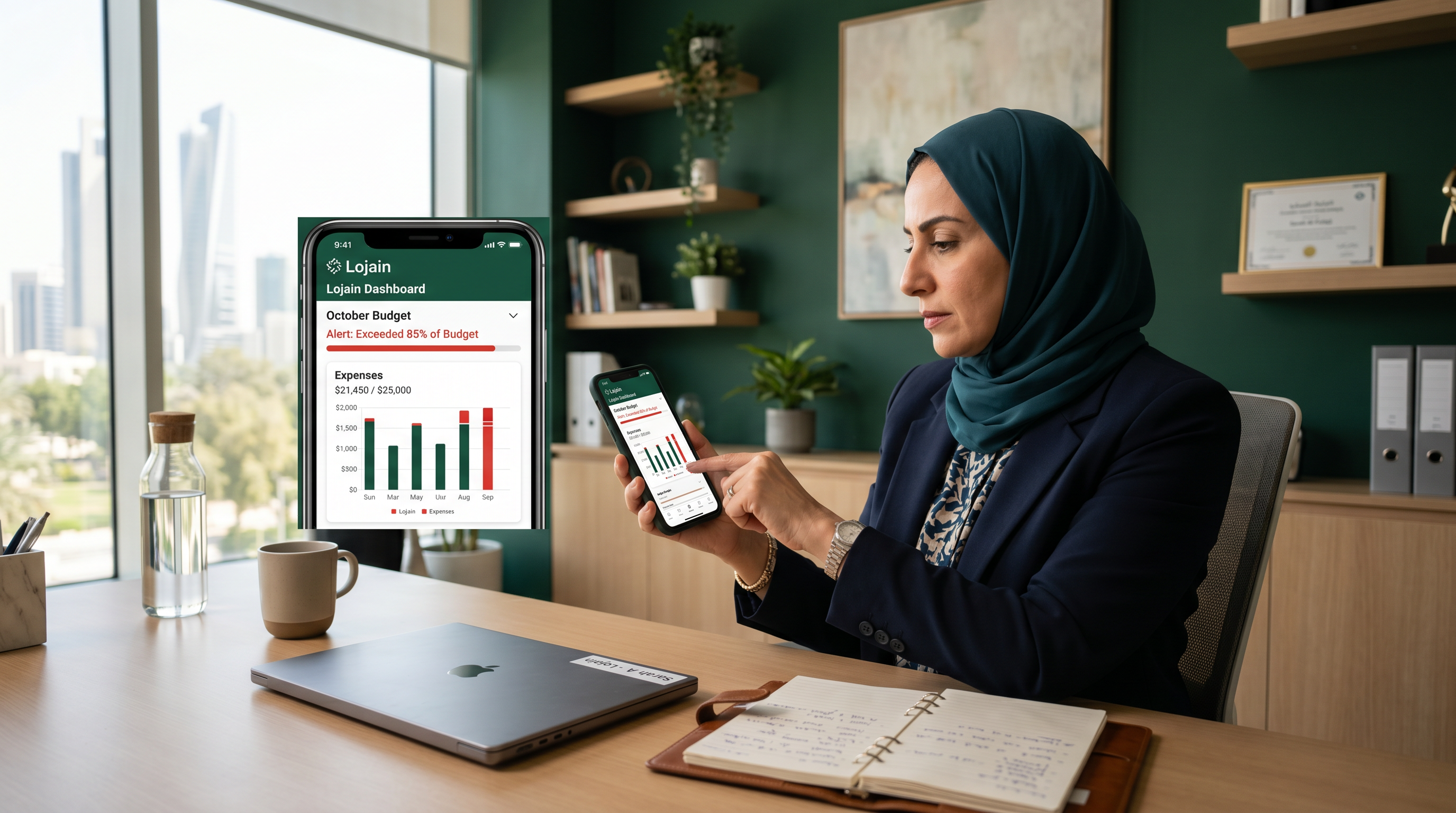
Last month, a Salmiya salon owner watched her Lojain AI bill spike 340 KWD higher than planned because customer inquiry volume doubled during Ramadan. She had no spending guard. This month, she configured Over-cap fallback to trigger at 200 KWD. When that threshold hit on day 19, the system automatically downgraded conversations from full AI responses to templated replies—her bill stabilized at 210 KWD, customers still got answers, and she never missed a booking inquiry.
If you run a clinic in Hawalli, a restaurant in Mishref, or a real estate brokerage in Kuwait City, you know this problem: WhatsApp message volume is unpredictable. Seasons shift. Campaigns drive traffic. A viral TikTok mention sends 500 new inquiries in 48 hours. Lojain AI's Over-cap fallback solves this by letting you set a hard spending ceiling and define exactly what happens when you approach it.
This guide walks you through how it works, why it matters for your margin, and how to configure it so you sleep at night knowing your WhatsApp costs are protected.
What is Over-cap fallback and why does it exist?
Lojain AI runs on WhatsApp's paid messaging infrastructure. Each message your AI agent sends—whether it's answering a pricing question, confirming an appointment, or processing a refund request—incurs a per-message cost. In the GCC, that ranges from 0.012 KWD to 0.035 KWD depending on message type and destination.
Scale matters fast. A customer service conversation that involves 8–12 back-and-forth exchanges can cost 0.20–0.40 KWD per customer. If you're running 100 conversations a day, that's 20–40 KWD daily. Over 30 days, you're at 600–1,200 KWD just in message costs. Add a seasonal spike—Eid, back-to-school, end of lease season—and volume doubles. Your monthly bill suddenly jumps from 800 KWD to 1,800 KWD.
Over-cap fallback exists because spending shocks kill margins. You can't fire a customer. You can't tell them to stop asking questions. But you need control. Over-cap fallback lets you define a budget ceiling—say, 300 KWD per month—and automatically downgrade to a lower-cost response pattern when you hit 80% or 90% of that budget.
After running 35+ WhatsApp AI deployments across Kuwait and GCC clinics, salons, restaurants, and real estate brokerages, we've seen that the businesses which thrive are the ones that plan for volatility, not the ones that react to bills.
How does Over-cap fallback actually trigger?
Over-cap fallback works in three layers: threshold, trigger, and action.
- You set a monthly spend cap — typically 80–90% of your actual budget. If your approved WhatsApp spend is 500 KWD, you set the cap at 400–450 KWD.
- Lojain monitors cumulative daily spend — it tracks every message sent, tallies the cost, and compares it to your cap in real time.
- When spend hits your threshold, the fallback rule activates — the AI switches behavior automatically. Instead of generating custom responses, it routes conversations to templated answers, escalates to human agents, or pauses new conversations from unknown numbers.
- You're notified immediately — you get a WhatsApp notification and dashboard alert showing that fallback activated and why.
The system doesn't shut down customer conversations. It downgrades them intelligently. A customer asking "What time do you open?" still gets an instant answer—just from a template instead of AI generation. A customer asking "Can I reschedule my appointment?" gets escalated to your team instead. Both outcomes cost less and both keep the customer served.
Which fallback modes should you choose?
Lojain offers four fallback actions. Your choice depends on your business model and risk tolerance.
| Fallback Mode | Cost Impact | Customer Experience | Best For |
|---|---|---|---|
| Template Responses Only | 90% cost reduction | Instant, pre-written answer; feels less personal | High-volume FAQs (hours, location, pricing) |
| Escalate to Human Agent | 50% cost reduction (uses cheaper agent messages) | Immediate human touch; requires staff availability | Service-heavy businesses (clinics, real estate) |
| Queue and Delay | 65% cost reduction | Response delayed 2–4 hours; batched with humans | Non-urgent inquiries (newsletter signups, reviews) |
| Pause New Conversations | 100% cost reduction for new chats | New customers see "we'll respond soon" message | Extreme spike protection (viral events, sales) |
Most Kuwait and GCC businesses we work with use a hybrid: Template Responses for the first 80% of cap, then escalate to Human Agent at 90%, then Pause New Conversations at 100%. This gives you three stages of cost management instead of one cliff.
Step-by-step: how to set up Over-cap fallback in Lojain
- Log into your Lojain dashboard and navigate to Settings → WhatsApp AI → Budget Control.
- Enter your monthly spend cap — use 80–90% of your approved budget. If you have 500 KWD allocated, enter 400 KWD. This gives you a 100 KWD buffer for unexpected spikes.
- Set your threshold percentage — choose when fallback activates relative to your cap. We recommend 85% threshold (fallback triggers at 340 KWD if your cap is 400 KWD) to give you early warning.
- Select your primary fallback mode — pick one from the table above based on your business. Most starting point: Template Responses.
- Configure your template bank — write 8–12 pre-approved responses for the most common questions (operating hours, pricing, how to book, refund policy). Keep them in both English and Gulf Arabic if your audience is bilingual.
- Set a secondary fallback — if primary fallback is active and spend continues climbing to 95%, trigger a second action (escalate to agent or queue). This prevents a runaway month.
- Enable notifications — turn on WhatsApp alerts so you get pinged the moment fallback activates. Screenshot that alert and review why volume spiked. Is it a campaign success? A competitor's temporary closure? A viral mention?
- Test it with staging data — don't launch live. Ask your Lojain onboarding specialist to simulate 500 messages in your sandbox environment and confirm fallback triggers correctly at your chosen threshold.
- Review and adjust weekly — after your first two weeks live, check your dashboard. Did fallback activate? When? Why? Adjust your cap and threshold based on actual spend patterns, not guesses.
This process takes 15 minutes to set up and 5 minutes per week to monitor. The payoff: you never have a surprise 2,000 KWD WhatsApp bill again.
Real example: Hawalli clinic during flu season
Dr. Amira runs a family medicine clinic in Hawalli. Pre-Lojain, patient inquiries came via phone and walk-ins. After deploying Lojain AI for clinics, she automated appointment confirmations, appointment rescheduling, and basic symptom screening.
In November, flu season hit Kuwait. Her clinic traffic increased 180%. One day she noticed her Lojain message count had jumped from 80 messages/day to 340 messages/day. Without Over-cap fallback, her monthly bill would have exceeded 1,200 KWD (her cap was 600 KWD). Instead, she had configured fallback to activate at 85% of 600 KWD (510 KWD). When that threshold hit on November 18, Lojain automatically switched to escalate-to-agent mode. Her staff still answered patient questions, but the AI wasn't generating custom responses anymore. Message cost per inquiry dropped from 0.032 KWD to 0.008 KWD.
Final result: 620 KWD for the month (just 3% over cap) instead of an estimated 1,250 KWD. She didn't turn away patients. She didn't reduce service quality. She just got smart about resource allocation. The clinic's margin stayed healthy even during peak demand.
Real example: Mishref restaurant during Ramadan
Rashid owns a family-friendly restaurant in Mishref. He integrated Lojain AI to handle WhatsApp reservation requests, delivery order questions, and menu inquiries. His budget: 400 KWD/month for WhatsApp AI.
Ramadan 2024 was chaos. His restaurant became the go-to spot for breaking fast. Reservation requests came at 10x normal volume. Without Over-cap fallback configured, his WhatsApp bill would have been 3,800 KWD by day 15. Instead, he had set a cap at 350 KWD with an 80% threshold trigger.
On Ramadan day 12, when spend hit 280 KWD, his fallback activated: all new reservation requests from unknown numbers automatically received a templated response ("We're fully booked tonight, but we can reserve you for tomorrow at 19:00. Confirm Y/N?"). Existing customers who'd chatted with the AI before got escalated to his reservations team instead. Cost per message dropped 75%. Volume stayed high—still 250 messages/day—but his bill for the month came to 385 KWD. He lost zero customers. He lost zero revenue. He just didn't overpay WhatsApp.
When should you adjust your cap and threshold?
Over-cap fallback isn't set-it-and-forget-it. You should review and adjust quarterly based on three signals: actual spend, customer feedback, and business seasonality.
Signal 1: You're hitting fallback every month. If fallback activates on day 20 consistently, your cap is too low. Increase it by 15–20% and monitor for two months. A cap that triggers monthly is a signal that demand has grown, not that you've miscalibrated.
Signal 2: Customers are complaining about delayed responses. If your queue-and-delay fallback is active and you're hearing "Why did it take 4 hours to confirm my booking?", your threshold is too aggressive. Either raise your cap or switch to escalate-to-agent mode. Revenue and reputation matter more than message savings.
Signal 3: Seasonal patterns appear. If you run a salon, Eid and wedding season will drive 3–4x normal volume. If you run a clinic, flu season and Ramadan spike demand. If you run a restaurant, Ramadan and National Day are peak. Plan ahead. Increase your cap 4 weeks before expected peaks so you don't trigger fallback during your best-earning season.
The businesses that optimize Over-cap fallback most effectively are the ones that treat it as a quarterly conversation, not a one-time setting.
How Over-cap fallback compares to manual budget controls
Before Lojain, many Kuwait businesses tried to manage WhatsApp costs by:
- Turning off the chatbot manually when they "thought" they'd hit budget (cost them lost sales and frustrated customers)
- Paying large overage bills monthly and absorbing the hit (destroyed Q4 margins)
- Using a low-cost chatbot with poor NLP that customers hated (drove traffic to competitors)
- Hiring a full-time customer service person to handle WhatsApp instead (added 1,500–2,000 KWD/month payroll)
Over-cap fallback automates that decision. You don't wake up on day 25 and panic-disable your AI. The system intelligently downgrades, stays profitable, and adapts in real time. It's the difference between reacting to your budget and controlling it.
Is Over-cap fallback available on all Lojain plans?
Over-cap fallback is available on all Lojain tiers starting from the Lojain Lite bundle and up. It's not a premium add-on; it's a core feature. The reason: we believe cost control should be available to every business, not just enterprise customers.
If you're still comparing options, see how Lojain compares to WATI on budget controls and automation depth. Spoiler: our fallback system is more granular and easier to adjust on the fly.
For detailed pricing and which tier fits your volume, check our pricing page. Over-cap fallback setup is included in onboarding at no extra cost.
Common mistakes when configuring Over-cap fallback
Mistake 1: Setting your cap too low. A Salmiya salon owner set her cap at 150 KWD (the original WhatsApp marketing cost from 5 years ago). She had 80 active customers. Her cap triggered by day 8. She was constantly in template mode, customers complained, and she disabled fallback entirely. Lesson: base your cap on recent actual spend, not historical guesses.
Mistake 2: Not configuring templates before going live. You enable fallback but your template bank is empty. When fallback triggers, customers get a generic "Please wait, we'll respond soon" message. They feel ignored. You look unprepared. Always write and test your templates in the Lojain sandbox first.
Mistake 3: Setting a single fallback action instead of tiered. If your only option at cap is "Pause New Conversations," you shut off revenue during your busiest moments. Instead, use three tiers: Template (85% of cap), Escalate (92% of cap), Pause (100% of cap). This gives you three chances to manage before a hard stop.
Mistake 4: Never monitoring or adjusting. You set fallback in month 1 and never look at it again. Six months later, your business has grown 40%, but your cap hasn't. Fallback triggers constantly. Spend 10 minutes quarterly reviewing your dashboard. Track when fallback triggered, why, and whether it's still appropriate for your business.
FAQ: Over-cap fallback and Lojain cost management
Q: If Over-cap fallback is active, does it cost less to send a message?
A: Yes. A template response costs 70–90% less than an AI-generated response because it's pre-written and doesn't require processing. An escalated message to a human agent costs less than AI but more than a template. Pausing new conversations costs zero for that customer.
Q: Can I pause Over-cap fallback temporarily if I'm running a promotion?
A: Yes. You can disable fallback for specific date ranges (e.g., "Disable fallback July 15–31 for Eid sale"). This is useful if you're intentionally expecting a spike and have approved a higher budget for that period. Disable it in Settings → Budget Control → Exceptions.
Q: What happens to customers mid-conversation when fallback triggers?
A: Existing conversations continue with whatever fallback mode you've set (templates, escalation, etc.). New conversations from unknown numbers follow the fallback rule. A customer already chatting with your AI doesn't suddenly stop getting responses.
Q: Can I set different caps for different days of the week?
A: Not per day, but yes per event. You can create fallback rules for known peaks (Ramadan, end-of-month, weekends). For example: "Standard cap 400 KWD weekdays, 600 KWD weekends, 1,000 KWD during Ramadan." Your Lojain specialist can set this up during onboarding.
Q: If fallback activates and spend keeps climbing, is there a hard stop?
A: Yes. Lojain enforces a hard ceiling at 110% of your cap. If your cap is 500 KWD, no more messages are sent after spend hits 550 KWD—regardless of fallback mode. This is a safety mechanism to prevent overage bills.
Q: How quickly does fallback activate after spend crosses the threshold?
A: Instantaneously. The system checks spend in real time after every message. The moment your spend hits your threshold percentage, the next incoming message triggers the fallback rule. No delay. No lag.
Q: Can I get a refund if I accidentally trigger Over-cap fallback?
A: No, but you can request a spend adjustment if fallback was triggered due to a system error (e.g., a bug that sent duplicate messages). Contact your KIRA account manager with logs. Legitimate spend—even if it triggers fallback—is your responsibility to manage.
Why is Over-cap fallback essential if you're using WhatsApp AI
Here's the reality: WhatsApp Business API messaging is a utility cost that scales with customer demand. Unlike your rent or payroll, you can't predict it perfectly. A viral social media mention, a competitor closure, or a seasonal peak can 5x your volume in 48 hours.
Lojain AI is powerful exactly because it scales. You're not hiring 5 new customer service reps to handle Ramadan volume. Your AI handles it. But power without guardrails is expensive. Over-cap fallback is the guardrail.
The businesses we work with that thrive—like the Hawalli clinic and Mishref restaurant—aren't the ones that get lucky with low volume. They're the ones that plan for high volume and build cost controls in from day one. Over-cap fallback is that plan.
Configure it this week. Test it in your sandbox. Then forget about surprise bills forever.
Talk to Us on WhatsAppReady to Scale Your Marketing with AI?
KIRA delivers AI-powered marketing systems, WhatsApp automation, and media buying strategies for businesses worldwide.
Book a Strategy Call More ArticlesGet KIRA in your AI answers
Add KIRA as a Google Preferred Source so our articles show a "Preferred" badge in your AI Overviews & AI Mode results. Log in to Google, then tick the box next to kiraco.org.
Add KIRA as a Preferred Source