Quick Answer: WhatsApp Business API is a messaging channel that connects your business systems directly to customer inboxes, enabling automated responses, manual replies, and two-way conversations at scale. Setup requires a Meta business account, a verified phone number, and an integration partner. Costs start at message volume and approved provider fees.
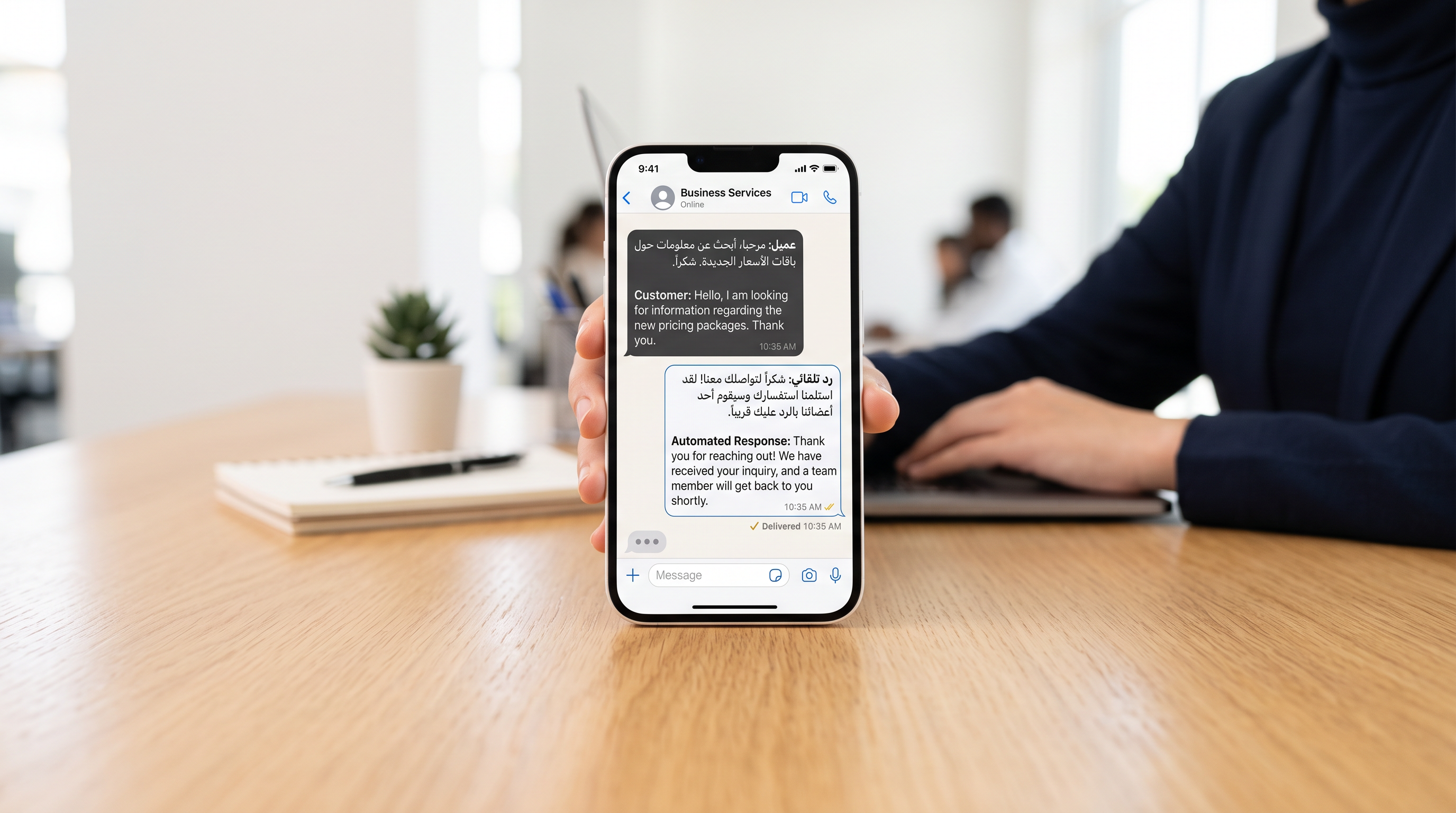
A café owner in Kuwait spends two hours daily answering the same reservation questions on WhatsApp. A clinic receptionist fields appointment queries from dozens of patients across three shifts. A real estate agent juggles inquiries on WhatsApp, Instagram, and SMS. For each, the problem is identical: customers expect instant replies on the channel they already use, but manual handling breaks at volume.
The WhatsApp Business API solves this by giving your business a direct, monitored channel to customer conversations. It is not a separate app. It is an integration that runs behind your own systems, letting you automate, route, and escalate messages without your team living inside WhatsApp itself.
What Is WhatsApp Business API and Why It Matters
WhatsApp Business API is Meta's enterprise messaging layer. It sits between your business systems (booking software, CRM, support ticketing) and customer phones. When a customer messages your WhatsApp number, your system receives the message in real time. Your system can reply instantly with an automated answer, route it to a team member, or log it for follow-up.
Unlike the free WhatsApp Business app (which handles one phone per user), the API scales to thousands of conversations simultaneously. It works with Arabic and English, stores message history, and integrates with your existing tools.
Why businesses choose it: customers reply faster on WhatsApp than email, costs per conversation are lower than SMS, and the channel is already trusted in the Gulf region.
How the WhatsApp Business API Connection Actually Works
The workflow has three moving parts.
- Your customer sends a message. They open WhatsApp, find your business number, and type a message. This message travels to Meta's servers.
- Meta routes the message to your integration. Your approved provider (a Meta-verified Solution Provider like KIRA) receives the message in real time via a webhook. Your systems have a split second to decide: reply automatically, assign to a team member, or queue for later.
- Your business replies. Whether automated or human-typed, your reply goes through your provider's API back to Meta, then to the customer's phone. The customer sees a normal WhatsApp conversation. They do not see or know about your backend systems.
This cycle happens instantly, 24/7. There is no dashboard the customer sees. From their view, it is just WhatsApp.
Step-by-Step: Setting Up WhatsApp Business API
- Verify your business with Meta. Create or connect a Meta business account. Provide legal business registration, address, and contact details. Meta reviews this in 1–5 days.
- Register a phone number. Use a dedicated business number (not your personal phone). It can be new or ported from another carrier. Meta will send a verification code via SMS to confirm you own it.
- Choose an integration partner. You cannot use the API directly without technical infrastructure. Select a Meta-verified Solution Provider. They host the servers, manage the webhooks, and handle API updates.
- Connect your systems. Your provider gives you API credentials. Your booking system, CRM, or support tool integrates these credentials. Now incoming messages hit your systems automatically.
- Build or deploy automation. Decide what triggers an instant reply: booking confirmations, order status, appointment reminders. Anything else routes to your team.
- Test and go live. Send test messages from a personal number. Verify replies arrive, automation fires correctly, and escalations reach your team. Then open to real customers.
The entire setup takes 1–3 weeks. Most of that is Meta's approval. The technical integration itself is 2–3 days for a competent provider.
WhatsApp Business API vs. WhatsApp Business App: The Real Difference
| Feature | WhatsApp Business App (Free) | WhatsApp Business API |
|---|---|---|
| How many conversations at once | One phone, one person, manual only | Unlimited, automated and manual |
| Message history | Stored on the phone only | Stored in your system and Meta's servers |
| Automation | Quick replies only (manual setup) | AI agents, conditional logic, integrations |
| System integration | None—manual work only | CRM, booking, payment, helpdesk |
| Cost | Free | Per message + provider fees |
| Arabic support | Yes | Yes, via approved providers |
The Business App works for a one-person operation. If you answer more than 50 messages a day, or need any automation, the API is essential.
Understanding WhatsApp API Costs
Pricing has two layers: Meta's message charges and your provider's service fee.
Meta's charges: You pay per message sent. Inbound messages (customer to you) are free. Outbound messages are charged at a tier based on message type and destination country. A text message to Kuwait costs more than a message to India. Media messages (images, documents) cost more than text.
Provider fees: Your integration partner (KIRA or another Solution Provider) charges a service fee for hosting, managing, and supporting your account. Some providers charge per message. Others charge a monthly subscription. Some offer a combination.
For a small business sending 500 messages per month, total cost ranges from low-double-digit USD to under 50 USD per month. For a clinic or salon sending 2,000 messages monthly, expect 100–200 USD combined. Larger enterprises sending millions pay on a negotiated volume basis.
Request a cost estimate from your chosen provider. They quote based on your expected volume, message types, and automation level. Do not trust generic "per-message" pricing without context—your actual cost depends on your mix of text, media, and template messages.
Common Pitfalls Businesses Run Into
Pitfall 1: Treating it like a personal WhatsApp number. The API is not a substitute for your personal account. It is a business channel. Do not use it to send spam, unsolicited promotions, or generic blasts. Meta suspends accounts that violate message quality guidelines. Send only messages the customer expects or requested.
Pitfall 2: No message template approval. Most outbound messages must use pre-approved templates. You cannot send a custom message to a new customer without permission. Automation works only within template limits. Set up templates for common scenarios (booking confirmation, order status, appointment reminder) before launch. This is not optional.
Pitfall 3: Assuming instant replies scale indefinitely. An automated reply takes 2–3 seconds to generate and send. If you send 10,000 replies at once, queuing and Meta's rate limits mean some reach customers minutes later. For time-sensitive responses, keep automation simple and lean on human replies for complex questions.
Pitfall 4: No escalation path. Automation handles simple queries. Complex questions need a human. Set up a queue so messages that do not match any automation rule reach your team immediately. Without this, customers wait forever or go to a competitor.
Pitfall 5: Ignoring Gulf Arabic support. If your customers speak Arabic, use an AI agent that handles Arabic fluently. Most providers in the region do not. Broken Arabic replies damage trust. If you offer bilingual support, verify your provider actually supports it—not as a checkbox, but as tested, working capability.
WhatsApp Business API vs. Alternatives: When to Choose It
WhatsApp Business API is not the only messaging channel. Competitors include SMS, Telegram, Viber, and proprietary chat apps. The choice depends on where your customers actually are.
WhatsApp is the right choice if: Your customers already use WhatsApp (they do, everywhere in the Gulf and globally). You need two-way conversations, not just broadcast notifications. You want lower cost per message than SMS. You serve any audience that values privacy and end-to-end encryption.
SMS is better if: You need 100 percent delivery guarantee for critical alerts (banking, healthcare). Your audience does not use WhatsApp. You send only one-way notifications, not conversations.
Telegram is an option if: Your audience is tech-forward and already there (less common in business). You want no moderation and less strict rules. Most businesses in the region do not prioritize Telegram for customer service.
For most businesses worldwide, WhatsApp Business API is the primary channel because adoption is already there. SMS remains a backup for critical, time-sensitive alerts.
How to Optimize Your WhatsApp API Setup
Segment your automation by use case. Do not build one monolithic bot. Create separate automation flows for reservations, support inquiries, order status, and payment. Each flow is simpler, faster, and less error-prone.
Measure response time. Track how fast your automated replies reach customers. If delays exceed 5 seconds, investigate rate limiting, webhook delays, or infrastructure issues. Fast responses drive engagement.
Route to the right person. When a message needs human review, route it to the team member best equipped to handle it—sales rep for inquiry, manager for complaint, technician for troubleshooting. Misrouting wastes time and hurts the customer experience.
Use templates effectively. Pre-approved templates are not restrictions; they are speed. Common messages (confirmation, reminder, offer) should always use templates. Custom replies are for edge cases, not the main flow.
Track metrics that matter. Message volume, response time, resolution rate, and conversation length are noise. Track revenue influenced by WhatsApp conversations, reservation completion rate via WhatsApp, and repeat customer rate. The channel is profitable only if it moves business metrics.
WhatsApp Business API for Different Industries
Restaurants and cafés: Customers book tables, ask about menu items, and check hours. Automation handles "we are open until 11 PM" and "table for four available at 7 PM". Staff replies to special requests. Result: fewer missed reservations, shorter wait times for customers.
Clinics and healthcare: Patients book appointments, ask for prescription refills, and request their test results. Automation confirms appointment times and sends pre-visit instructions. Staff replies to symptom questions. Result: reduced no-show rate, less front-desk workload.
Real estate: Prospects inquire about property listings, ask for viewing times, and request financing details. Automation sends property photos and confirms viewing appointments. Agents reply to investment questions. Result: faster response to hot leads, higher conversion from inquiry to viewing.
FAQ: WhatsApp Business API
Q: Can I use my personal WhatsApp number with the Business API?
No. The API requires a dedicated business number registered with Meta. Personal numbers are not eligible. You can keep your personal account separate.
Q: How long does it take for Meta to approve my business?
Usually 1–5 days. Approval is faster if your business registration documents are clear and your business is well-established. New businesses or unclear registrations can take 2–3 weeks.
Q: What if a customer messages me at 3 AM?
Your system receives the message in real time. An automated reply can go out immediately. Human replies depend on your team's schedule. Many businesses set automation to acknowledge the message and promise a callback during business hours.
Q: Is WhatsApp Business API available in my country?
WhatsApp Business API is available in almost every country, including Kuwait, UAE, Saudi Arabia, and worldwide. However, some countries restrict certain message types or require local partnerships. Ask your provider about any local restrictions.
Q: Can I send promotional messages on WhatsApp Business API?
Yes, but only to customers who have opted in or requested updates from you. Unsolicited promotional messages violate Meta's policies and result in account suspension. Build your opt-in list explicitly.
Q: How do I know if my messages actually reach customers?
Your provider gives you delivery reports. You see if a message was sent, delivered, read, or failed. Failed messages have a reason code (invalid number, blocked, etc.). Monitor this to catch delivery issues early.
Q: Can I integrate WhatsApp API with my existing CRM or booking system?
Yes. Any CRM or booking platform with API access can integrate with WhatsApp Business API via webhooks. When a customer messages you, the message can automatically create a ticket in your CRM or update a booking. Ask your provider if they support your specific tool. For Lojain AI, integration is built-in for booking systems, CRMs, and payment processors.
Moving From Manual WhatsApp to the Business API
If you currently use a personal WhatsApp account for business, migrating to the API is straightforward.
Step 1: Register your business number with Meta. Step 2: Move your customer list. If customers have your current personal number saved, announce the migration: "We have moved to a dedicated business line. Save this new number for faster responses." Step 3: Redirect your personal account to the new number in your WhatsApp status or a website link. Step 4: Set up automation in your new API account. Step 5: Archive the old personal account after customers confirm they have the new number.
The entire migration takes 2–3 weeks. Customer disruption is minimal if you communicate clearly.
The Hidden Advantage: Data and Insights
When you use the WhatsApp Business API, every conversation is logged in your system. You see what customers ask, what frustrates them, what they buy, and how long resolution takes. This data is gold.
Over time, you identify which questions come up most often (opportunity for better automation), which team members resolve issues fastest (who to train others), and which products generate the most inquiries (where to invest). Personal WhatsApp use does not give you this. The API does.
For businesses serious about growth, this data feedback loop justifies the cost alone.
Getting Started: Your Next Steps
You now understand how the API works, what it costs, and where it fits your business. The next step is to test it.
Choose a use case where manual replies consume the most time: appointment booking, order status, or simple support questions. Set up that automation first. Measure time saved and customer satisfaction. Once that works, expand to other use cases.
Do not build a perfect system on day one. Build a working one, learn from real customer conversations, then improve.
Talk to Us on WhatsAppReady to Scale Your Marketing with AI?
KIRA delivers AI-powered marketing systems, WhatsApp automation, and media buying strategies for businesses worldwide.
Book a Strategy Call More ArticlesGet KIRA in your AI answers
Add KIRA as a Google Preferred Source so our articles show a "Preferred" badge in your AI Overviews & AI Mode results. Log in to Google, then tick the box next to kiraco.org.
Add KIRA as a Preferred Source